

What's new in FD Combined Listings & Variant: Sidekick, MCP and price-aware swatches
By Rami, FittDesign ·
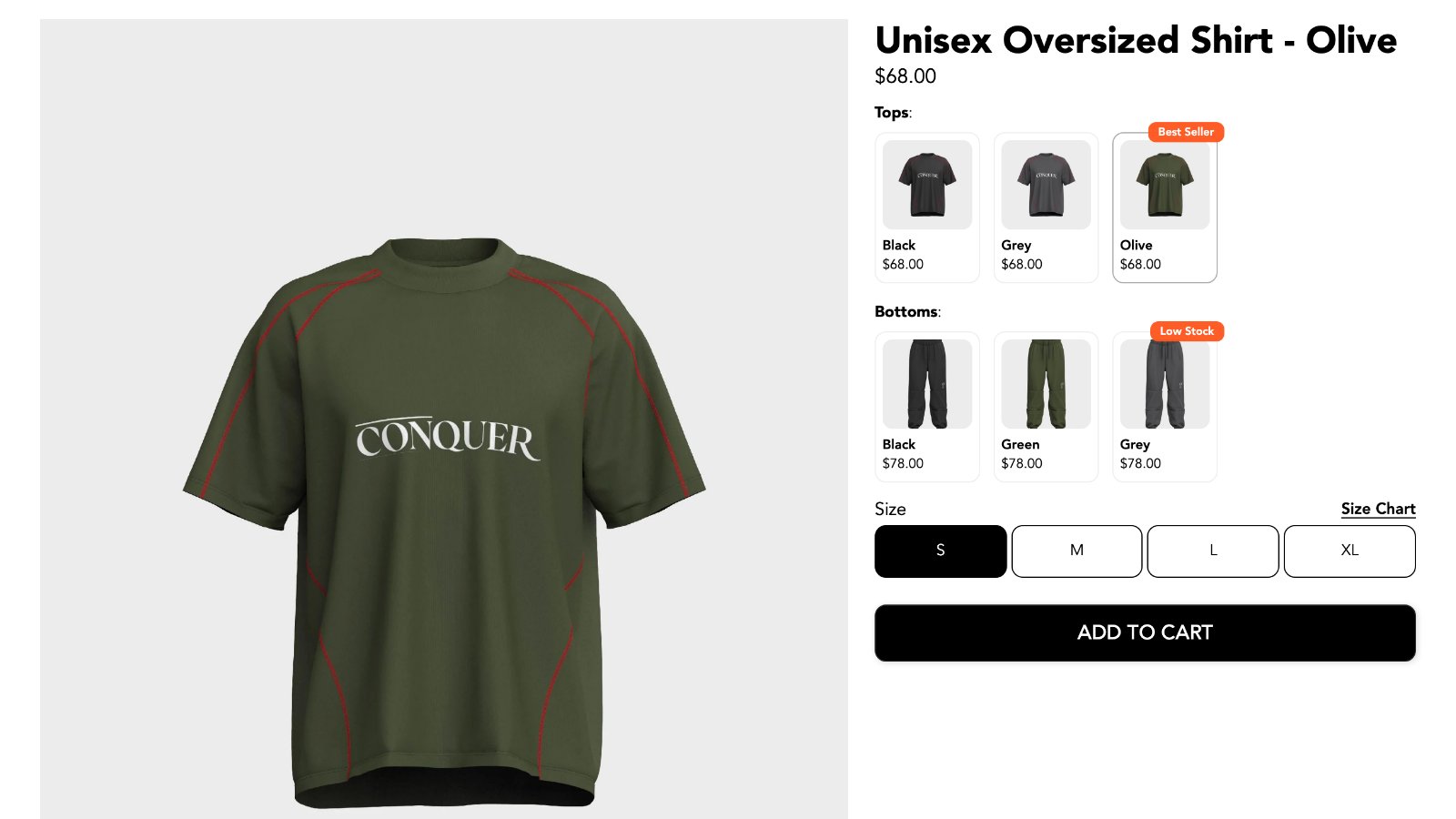
FD Combined Listings & Variant links separate Shopify products as variants. A shirt sold as one product per color shows up as one set of color swatches on the product page and on collection cards, while each color keeps its own URL, title, images and SEO.
This fall we added Shopify Sidekick support, an MCP server for AI clients, and price-aware swatches, plus a list of smaller updates. Here is everything that's new, and a recap of what the app does.
Create and edit groups with Shopify Sidekick
You can now ask Sidekick to do the setup for you:
- "Combine my Tote bags as variants by color."
- "In my Totes group, rename the values to Red, Navy and Oak."
- "Which group is the Linen Shirt - Olive in?"
Sidekick finds the products, opens the group form in the app and fills in the option name, values and swatch colors. Nothing changes on your store until you check the form and click Save. A group made through Sidekick saves exactly like one made by hand.
Sidekick handles groups with one option, like Color. Multi-option groups, subcategory groups and groups run by an automation are still edited in the app. How to use Sidekick with the app
An MCP server and Admin API
Agencies and stores with their own tools can now manage groups from outside the app:
- Admin API. List, create and update product groups, and list and update swatch templates. Use it for a PIM sync, a nightly script or a migration. A successful write is live on the storefront right away.
- MCP server. The same API works as tools in Claude, Cursor and other MCP clients. Your MCP URL is under Settings in the app.
API access is turned on per store. Ask us in the in-app chat. MCP and API setup
Swatches that show the right price
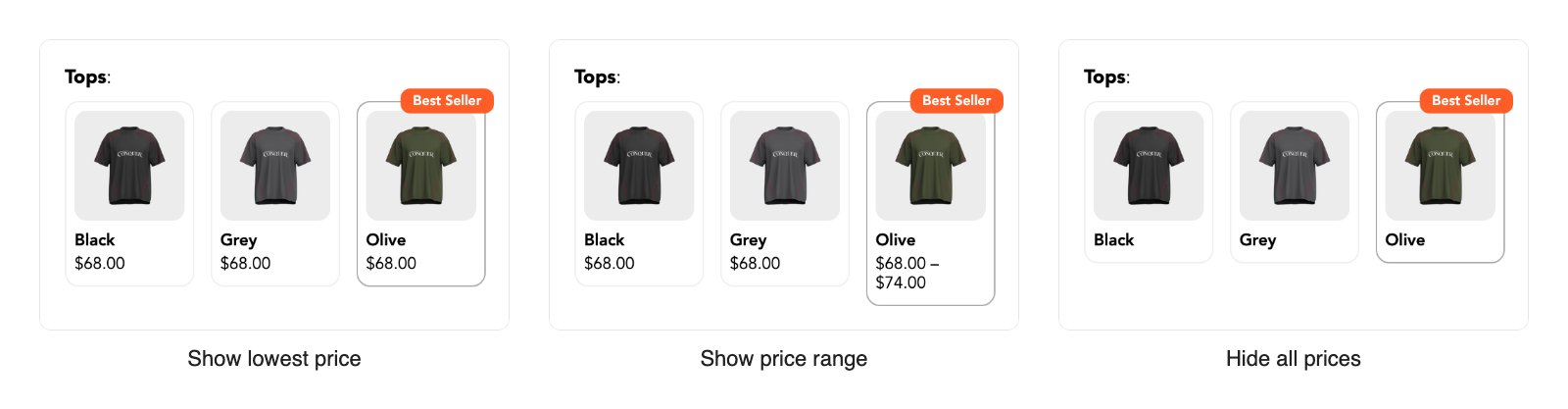
When a product's variants have different prices, like a larger size that costs more, you now choose what its swatch shows under "When variant prices differ":
- Show lowest price (the default)
- Show price range
- Hide all prices
The selected swatch now shows the price of the variant the shopper picked, not the lowest price in the product.
Smaller updates
- Hover to preview labels. Swatches and buttons can show the name of the option under the cursor, so shoppers can read "Olive" before they click it. Turn it on per template under the Label tab.
- Quick switch for the whole page. Quick product switching already swapped the product section without a reload. It can now swap the whole page, for themes that show product banners, tabs or related content outside the product section.
- Judge.me reviews follow the product. When a shopper switches product with quick switch, the Judge.me reviews and review form update to the new product.
- Smart fill from SKU codes. If your product titles end in a unique code, smart fill uses it as the option value.
- The app in 5 languages. The app's admin is now available in English, French, German, Spanish and Turkish.
- More themes. The app has ready-made settings for 223 themes, and supports both Canopy 4 and 5.
- No jumping image swatches. Polaroid swatches keep their space while images load, so the page doesn't jump.
What the app does
If you're new to FD Combined Listings & Variant, here's the full picture.
Link products without merging them. Each product stays a separate Shopify product. You keep its URL, title, images, reviews and product feed data. Shoppers see one product with swatches.
Swatch styles for any store. Color, two-color, image, circle, polaroid, button, dropdown and slider styles. Grid, swipeable or slide-out panel layouts. Colors, sizes and borders are yours to change. On Starter, the AI style assistant can change a template from a chat message.
Product pages and collection cards. Swatches show on the product page and on product cards on collection pages.
Groups for every catalog. Single-option groups (Color), multi-option groups (Color and Size across products), and subcategory groups.
Bulk grouping and automations. Create groups in bulk from title patterns, handle patterns, a metafield or a CSV file. Automations keep groups up to date as you add products, using title, handle, type, vendor, tags, price, collection or a metafield.
Stays in sync. Product changes update the swatches by themselves. Sold-out products can be hidden, faded or crossed out, and draft products are hidden.
Works with your theme. Add the app block in the theme editor. Themes without app blocks can use custom placements, and we can set them up for you.
Markets and translations. Prices follow the shopper's market. Option names, values and badges can be translated for each store language.
Split products. The opposite tool: turn the variants of one product into separate products. Included on paid plans.
Support from people. Live chat and email in the app.
Pricing
| Plan | Price | Groups | Automations |
|---|---|---|---|
| Free | $0 | 10 | none |
| Starter | $4.95 / month | 1,000 | 1 |
| Pro | $19.95 / month | Unlimited | 5 |
Paid plans add split products. Starter includes 100 AI credits for the style assistant. Yearly billing saves 20%.
Try it
Install FD Combined Listings & Variant on the free plan, or see it on our demo store. If you need help, open the chat in the app.


